Questing
You must have installed the Quest Extension before proceeding with any quest-related features.
The questing section on our docs is currently being rewritten. If you want the old documentation that is complete read: Old Quest Documentation
Typewriter's Unique Approach to Quests
In Typewriter, quests are visual reflections of your game state, not the drivers of it. Use permanent facts to track real progress, and let quests simply display that progress to players.
🔑 Key Concept
Unlike traditional quest plugins where completing quests directly triggers progression, Typewriter separates:
- Game State - Facts that drive true progression
- Quest Display - What players see in the UI
⚙️ How Quests Work
Quest state is determined by:
- If Completed Criteria are met → Completed
- If Active Criteria are met → Active
- Otherwise → Inactive
💪 Why This Is Powerful
Guide players with goals, not just clicks. Use immersive objectives like Find a way into the locked study instead of the rigid Use the Silver Key on the Study Door.
Provide various ways to begin the same quest. The investigation can begin by Being briefed by the chief detective OR by independently finding the Discarded Ransom Note.
Objectives can update based on time or lack of progress. If Search the market district for clues yields no results after a while, it might refine to Focus your search near the merchant stalls.
Display the most relevant task based on context. At the plaza, show Ask locals about the suspect, but enter the nearby alley, and it updates to Check the alley for escape routes.
Adapt the quest depending on the players' actions. Based on evidence found, objectives can change to Investigate the garden shed or Confront the butler.
Prior decisions influence current tasks. A corrupt detective might get Plant misleading evidence instead of Collect all available evidence.
Visual Guide: How Facts Drive Quests
Quest Progression Flow
How facts drive quest states in Typewriter
Not Started
Quest Fact = 0Searching
Quest Fact = 1Item Fact = 0Item Found
Quest Fact = 1Item Fact >= 1Completed
Quest Fact = 2Creating a Quest
In Typewriter, quests are created using the Quest entry.
The Quest Entry is only a visual representation of the quest state. It does not affect the quest state itself.
You must have a decent understanding of Typewriter's Facts and Interactions before starting with creating quests.
Adding the Quest Entry
In the top right corner of the Typewriter editor, click on the + button and search for Quest. Click on the + button to add it to your page.
Configuring the Quest Entry
The name shown in player's quest log (e.g., QuestGuide)
Condition for quest visibility (e.g., Permanent Fact >= 1)
Condition for quest completion (e.g., Permanent Fact == 5)
Visualizing the Quest Entry
In this editor you can increase and decrease the permanent fact used in the image on the right.
Try setting it from 0 to 5!
Inactive Quest
Permanent Fact = 0 (Inactive)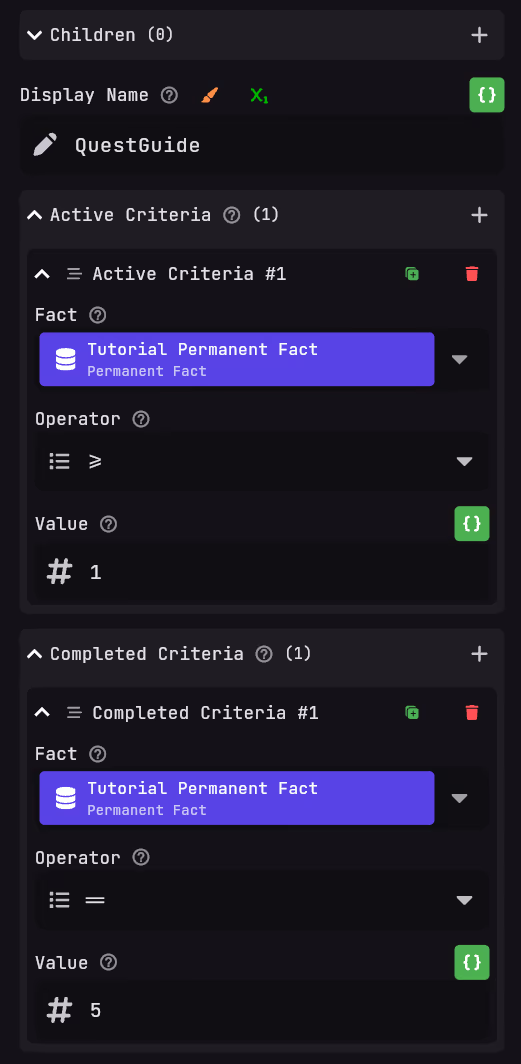
Adding objectives
You now have created a quest entry, but it doesn't have any objectives yet. For this documentation we have created multiple guides on how to do different objectives.
- Talk to NPC: Talk Objective
- Kill 10 Zombies: Kill Objective
- Gather 10 Emeralds: Soon
- Give to Npc (Mail delivery): Soon
Displaying the Quest
It is also possible to display the quest to players via placeholders. Read: BEING WRITTEN to learn more about this.