Interaction Bounds
This guide assumes that you have already installed the Basic Extension.
This guide is made for advanced users. It is recommended to have a good understanding of how Interactions work and function!
Before starting this guide there is some theory you need to know about interaction bounds before you should use them in your stories.
What are interaction bounds?
Interaction bounds are conditions that confine an interaction to a specific action or space. They provide control over when and how interactions can occur or be interrupted. A common example is cancelling a dialogue when the player walks away from an NPC.
Two Modes of Bounds
Interaction bounds operate in two distinct modes:
Interruption Mode
When in Interruption Mode, if the player breaks the bounding condition (such as walking out of a defined area), the interaction will be immediately cancelled. This is useful for casual conversations where you want to allow players the freedom to walk away.
Blocking Mode
In Blocking Mode, the player is prevented from violating the bounding condition altogether. The player cannot, for example, walk away from an important dialogue. This ensures players experience critical story moments fully before proceeding.
| Mode | Behaviour | Use Case |
|---|---|---|
| Interruption | Interaction cancels when bound is broken | Optional dialogues, ambient interactions |
| Blocking | Player cannot break the bound | Critical story moments, important instructions |
How Modes Are Determined
The mode is determined by comparing the priority of the interaction with the priority of the bound:
- If the interaction has a higher priority than the bound → Blocking Mode
- If the interaction has the same or lower priority than the bound → Interruption Mode
Entries inherit their priority from the page they belong to. You can set page priorities in the page properties panel.
How to use interaction bounds
Now that we have covered the theory, let's see how to use interaction bounds in your stories.
For this guide, we created 3 different examples to show you how to use interaction bounds in different situations:
- Interruption Mode
- Blocking Mode
- Interruption Mode (Entity Extension)
In this guide, we will show an example of how to make an interrupting interaction bound when the player walks away from a flower.
This guide will build upon the Interactions Guide and requires you to have at least an
On Interact With Block entry in your editor.
Adding the Interaction Bound
To add an interaction bound, right-click on the On Interact With Block entry and select Link with ..., search for Player Radius Interaction Bound and add it to your sequence.
Configuring the Interaction Bound
Now that we have added the interaction bound, we need to configure it.
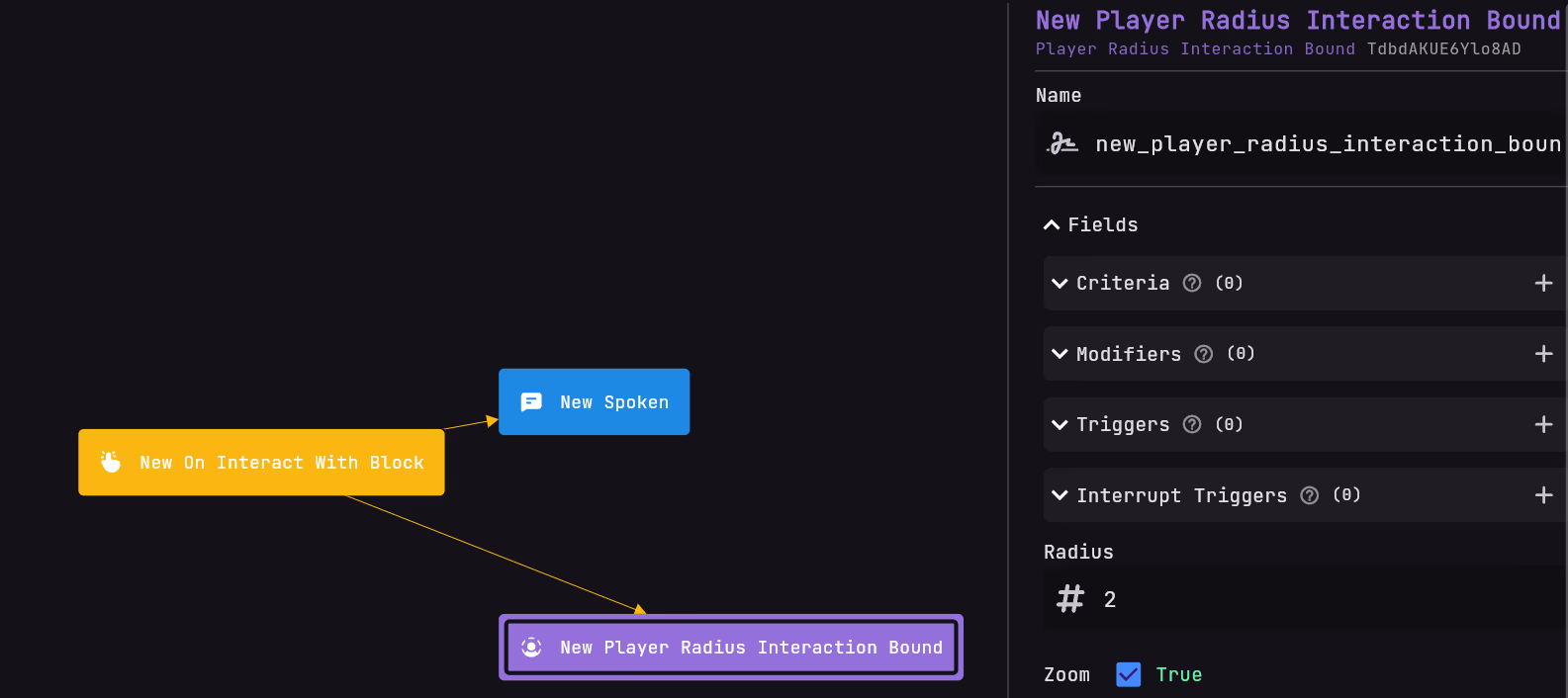
Select the Player Radius Interaction Bound entry and open the inspector
You now got 2 options to configure
- Radius: The radius of the interaction bound. This is the distance from the player where the interaction will be cancelled.
- zoom: If the player's camera should zoom in when the player is nearby and zoom out when the player is walking away.
Now, your sequence should look a bit like this:
Result
Now, your interaction should look like this:
In this guide, we will show an example of how to make a blocking interaction bound when the player walks away from a flower.
This guide will build upon the Interactions Guide and requires you to have at least an
On Interact With Block entry in your editor.
Adding the Interaction Bound
To add an interaction bound, right-click on the On Interact With Block entry and select Link with ..., search for Player Radius Interaction Bound and add it to your sequence.
Making it a blocking interaction
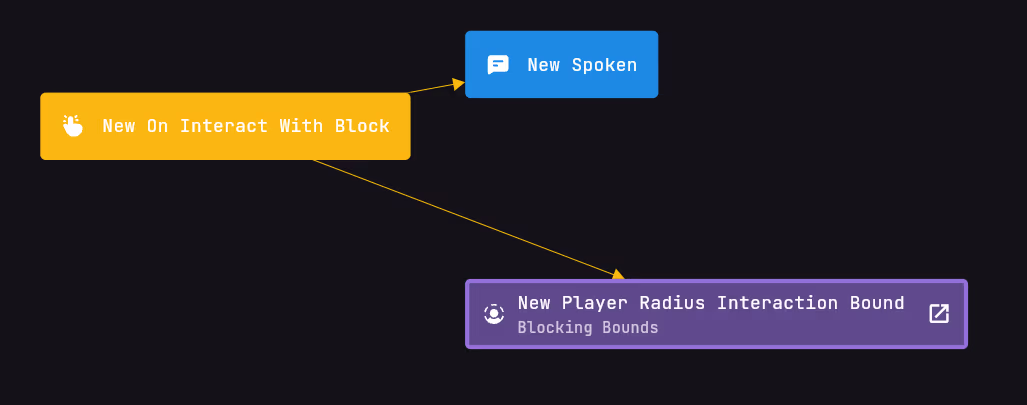
What you now have done is created an interrupting interaction bound. To make it a blocking interaction bound, you need to set the priority of the Spoken entry to a higher priority than the Player Radius Interaction Bound entry.
To do this,
- create a new sequence page. Name it something like
Blocking Bounds. - Select the
Player Radius Interaction Boundentry and hold it for a few seconds. - Drag it to the new page and drop it there.
- Right-click on the page that has the
Spokenin it. - Select
Change Priorityand set it to a higher number than thePlayer Radius Interaction Boundentry.
For example, if theBlocking Boundspage has a priority of 0, set the page containing theSpokenentry to 1. - Now, your sequence should look like this:
Result
Now, your interaction should look like this:
In this guide, we will show an example of how to make an interrupting interaction bound when the player walks away from a NPC.
This guide requires you to already have created a NPC using the Entity Extension
This guide is not yet available. Please check back later.