Entity Activities
Make sure to read Entities & NPCs before starting this tutorial.
In this tutorial, you'll learn how to assign activities to your entities.
What are activities?
By default, entities are static. Fortunately, activities can make them dynamic. For example, you can set up an activity that triggers when a player approaches the entity, or at specific moments—such as when the player talks to it. You can even use Road Networks to make entities travel between different nodes!
Assigning an activity to an entity
In this tutorial, we’ll configure Oliver to automatically move along a Road Network. When a player interacts with him, he’ll stop and turn to face them.
To do this, we'll use an In Dialogue Activity, which lets you define two separate behaviours: one when the player is talking to the entity, and one for when they're not.
Let’s update Oliver’s instance by adding an In Dialogue Activity.
Configuring the activity
The In Dialogue Activity controls two child activities, depending on whether the player is currently speaking to the entity.
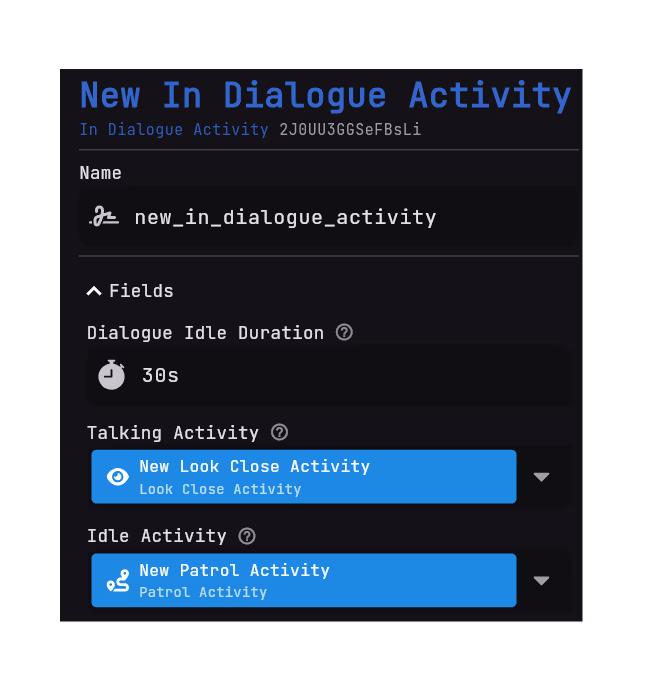
- For the Talking Activity, we’ll use a
Look Close Activity, so Oliver will look directly at the player during the conversation. - For the Idle Activity, we’ll use a
Patrol Activity, allowing Oliver to walk between the nodes of a Road Network.
If you haven’t created a Road Network yet, you can follow this tutorial: Road Network. You'll need to add the nodes you want by clicking on the button.
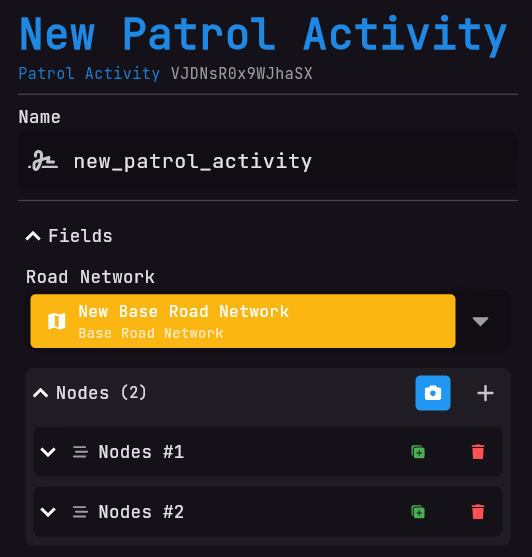
Final result
When a player interacts with Oliver, he will stop patrolling and turn to face them. Once the interaction ends, he will resume his patrol between the Road Network nodes.
Page Preview
- Manifest
- Static
- Sequence
This is an interactive graph of all the entries in the selected pages.
You can view different pages by clicking on the tabs. Each page contains a view of the entries in that page.
Click on an entry to view its details.